 Ferry

Installing it
sudo snap install ferryThe snap and the AppImage keep themselves up to date. The download page has the AppImage, the .deb and the .rpm, each for x86_64 and ARM64. Ferry needs Ubuntu 22.04, Debian 12, Fedora 36 or newer.
How it behaves on Linux
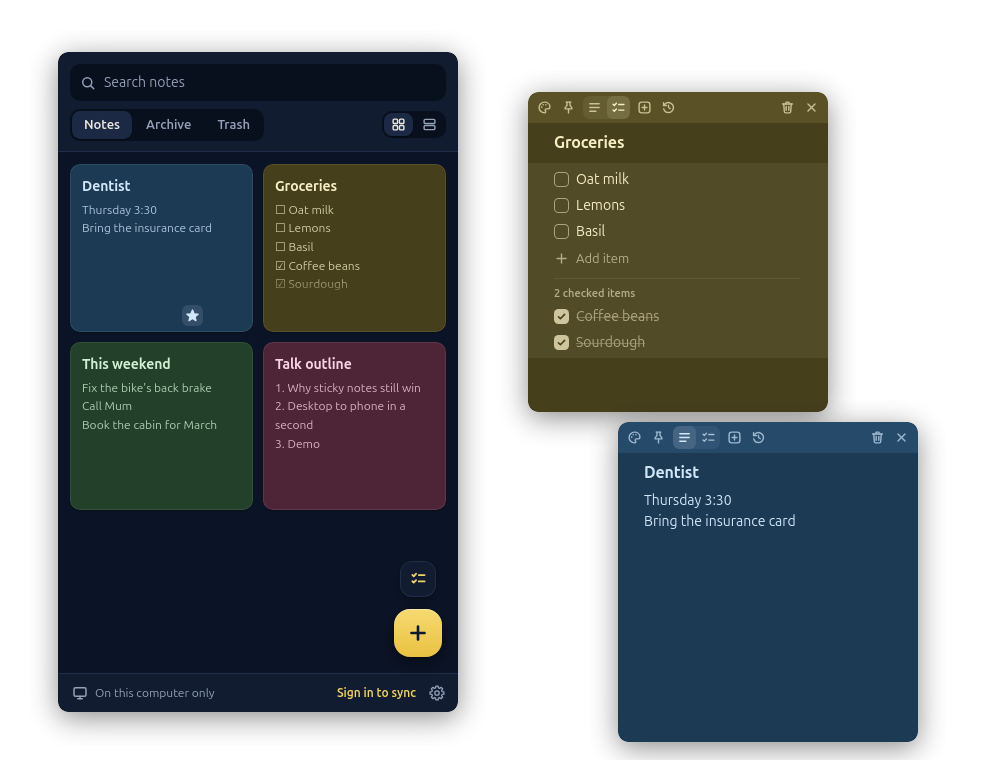
- Wayland. Notes reopen where you left them and can stay on top of everything else, on Wayland as on X11.
- The tray. An icon in the panel lists your notes and starts new ones. GNOME shows it through the AppIndicator extension, which Ubuntu includes.
- A shortcut. Wayland doesn't let apps set their own keyboard shortcuts, so Ferry's Settings give you a command to bind in your desktop's keyboard settings. It makes a new note from any app.
- Starting at login, if you turn that on.
- Light and dark, following your desktop's setting.
Ferry has been tried on Ubuntu 26.04 with GNOME and on Fedora 44 with KDE Plasma.
Good to know before you install
- Ferry is proprietary: its source isn't open.
- It's free with no account, and your notes then stay on the computer, in the app's data folder.
- Sync between devices is Ferry Pro: $2.99 a month, $19 a year or $39 once, after 30 days free with no card.
- Export gives you every note as Markdown and JSON, whenever you like, so your notes are never stuck in Ferry.
- Crash reports and anonymous usage counts are on unless you turn them off in Settings. Neither contains your notes: the privacy policy says what each holds.
What a note can do
- Text, checklists, headings and dividers in any note, in seven colors.
- Pinned notes, an archive, a trash you can restore from, and search.
- Version history brings back text you replaced.
On your phone
Sign in on the computer and the phone, with GitHub, Google, Microsoft, Apple or an email address, and the same notes are on both. On Android, iPhone and iPad, a widget on the home screen shows them without opening the app. They're on Windows too, in a browser at ferrynotes.app, and on the Mac.
Questions
Is there a Flatpak?
Not on Flathub. Ferry comes as a snap, an AppImage, a .deb and an .rpm.
Which processors does it run on?
x86_64 and 64-bit ARM, in every package.
Does it work without an account?
Yes. Signed out, nothing leaves the computer, and you can move notes to another device by exporting a file and importing it there.
How do I buy Ferry Pro on Linux?
In Ferry's Settings, under Ferry Pro. You pay on Stripe's checkout in your browser, and one purchase covers every device signed in to your account.